
Digg Dugg News Sluice
Filters and organizes the Digg.com feed with favorites, filters, muting, and a classic theme.
Get the Extension
How it Works
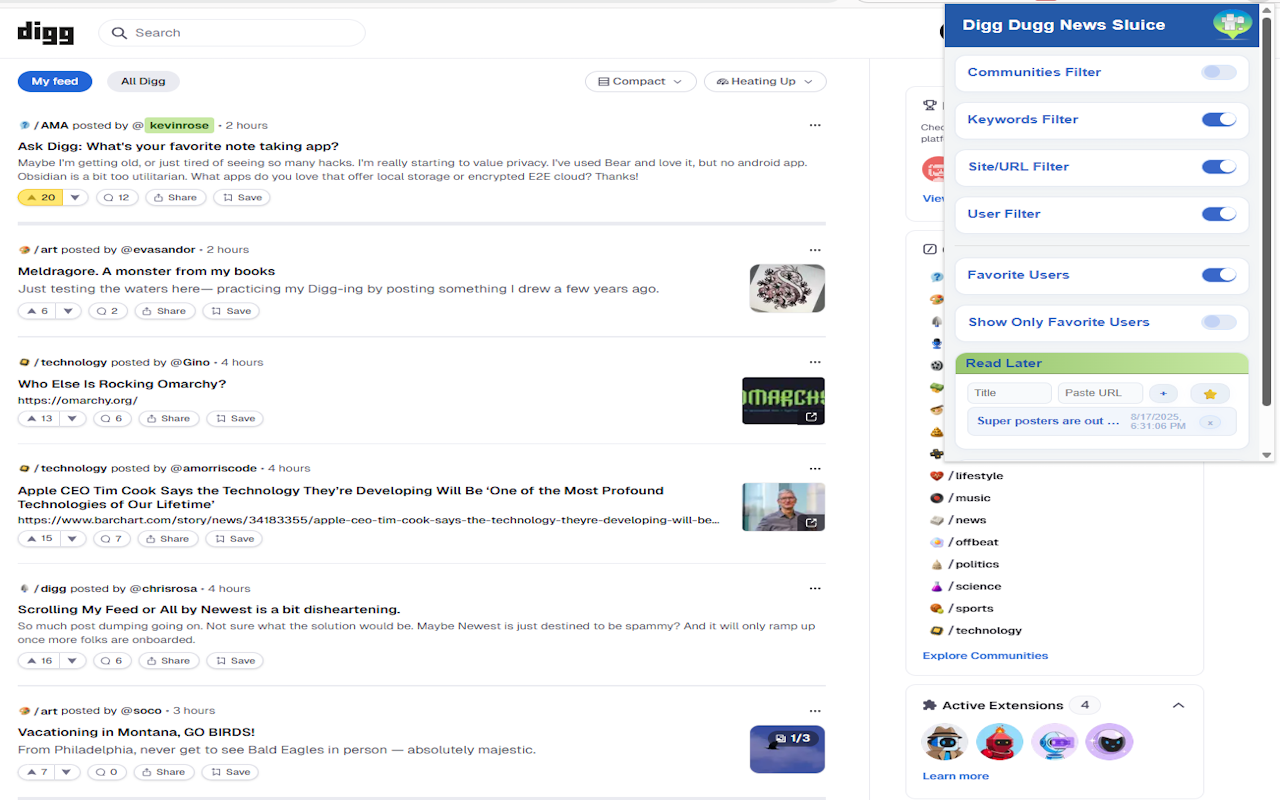
Digg Dugg News Sluice is a lightweight extension that gives you back control of your browsing experience on Digg.com. It allows you to filter out unwanted content and personalize your feed with a variety of powerful, user-friendly tools. All of your settings are saved directly in your browser's storage, so they are always ready to go.
Key Features
Filters
Block posts by keywords, specific URLs, or by a user's name to see only the content you care about.
Favorites & Highlights
Highlight posts from your favorite users, or filter your feed to show only their content.
Read Later List
Save articles with a single click and access them anytime from the extension's popup, perfect for when you're on the go.
Classic Theme
Apply a nostalgic, classic-themed style to the modern Digg.com layout for a familiar feel.
Frequently Asked Questions
Is this extension free?
Yes, Digg Dugg News Sluice is completely free and open-source. There are no ads or in-app purchases.
How does it handle my data?
All of your filter settings and saved articles are stored securely and locally on your computer. The extension does not collect, transmit, or share any personal data.
How do I use the filters?
To use a filter, simply click the extension icon, enter your keywords or usernames in the text box, and click the "Save" button. Make sure the toggle switch is enabled to activate the filter.
Does it work on other websites?
The extension is designed specifically for the layout and code of Digg.com and will not affect any other websites you visit.